

You listed your rental property online, and now the numbers are rolling in. Your listing has generated thousands of impressions—but only a handful of renters have contacted you.
What gives?
If you see thousands of impressions and only a handful of leads, it can be easy to assume that renters viewed your listing and almost none of them were interested. But impressions, listing views, and leads measure different types of renter activity.
Understanding the differences can help you gain insight into your listing's performance and help you make informed decisions about what, if anything, you should change.
Here's how to make sense of your rental listing analytics and how to use them to gauge your marketing efforts.
What Are Rental Listing Analytics?
Rental listing analytics are measurements, also called metrics, that show how renters are interacting with your property as they search for a home online.
These metrics may tell you how often your property appeared in search results, how many renters viewed your listing, and how many contacted you about the property.
One of the most important distinctions to understand is the difference between impressions, views, and leads. These metrics can be thought of as stages in a search funnel, which represents the steps renters take as they move from discovering a property to viewing the listing and making contact.
It's called a funnel because the audience is typically largest at the top and gets smaller at each stage as people narrow their choices. For the rental search process, the funnel can look like this:
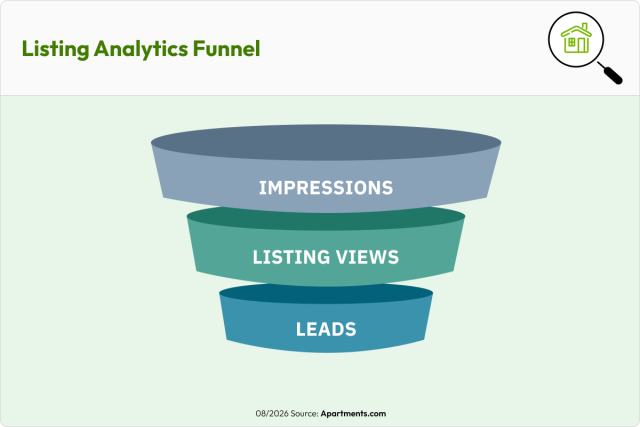
Impressions sit at the top of the funnel, where renters have an opportunity to encounter your property. Listing views represent renters who show greater interest by exploring the property further. Leads are farther down the funnel because these renters have taken another step by contacting you.
A renter can encounter your property without viewing the full listing, and they can view the listing without contacting you. That's why the numbers generally get smaller as renters move through the funnel.
What Is a Rental Listing Impression?
An impression measures exposure. In other words, it indicates that your property appeared where a renter had an opportunity to see it. That's different from a renter actually opening and viewing your full property listing.
Consider how people shop for rentals online. A renter may search for apartments or houses that match certain criteria and encounter numerous properties while browsing the results. Your property can appear during that search even if the renter ultimately chooses to explore another option.
An easy way to think about it is window shopping. If 100 people walk past a store window, the merchandise had 100 opportunities to catch someone's attention. Some may stop to browse, some may go inside and make a purchase, and others may simply continue on their way.
Similarly, an impression signals visibility. More impressions mean more opportunities for renters to encounter your property—not that every impression will become a listing view or lead.
What's the Difference Between an Impression, a View, and a Lead?
Although these metrics are related, they represent different types of renter activity.
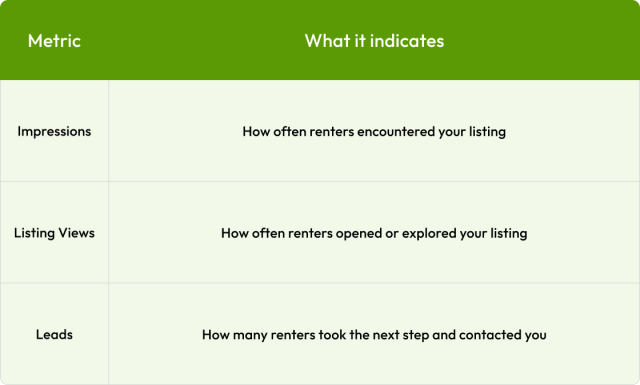
Someone might encounter your listing while browsing multiple rentals. A smaller group may decide the property looks relevant enough to view. And an even smaller group may decide it meets enough of their needs to contact you.
Renters often consider multiple properties during their search rather than focusing on a single listing. So it's normal for your impressions, views, and leads to be different numbers.
Why Do I Have Thousands of Impressions but Only a Few Leads?
The difference often comes down to where renters are in the search funnel. Impressions, listing views, and leads represent different levels of renter interest, so the numbers naturally vary from one stage to the next.
For example, a listing analytics report might show:
10,000 impressions → 1,000 listing views → 100 leads
Seeing those numbers doesn't mean 10,000 renters carefully reviewed the listing and 9,900 rejected it. Instead, think about the renter actions behind those numbers:
- The property appeared as renters searched, generating impressions.
- Some renters may have kept scrolling because another listing caught their eye or better matched their immediate preferences.
- Other prospects clicked onto the listing to learn more.
- And of the renters who explored it further, some may have decided to reach out.
Renters narrow their choices for many reasons, including:
- Monthly rent price, fees, and other costs
- Location, such as the neighborhood or surrounding area
- Property type
- Availability date
- How the property appears in photos
- Amenities offered
All of these factors makes impressions important because renters can only consider a listing once they've had the chance to encounter it.
What Can Your Listing Analytics Tell You?
Once you understand what each metric represents, analytics become easier to interpret. Looking at the relationship between your metrics can provide valuable context about how renters are interacting with your listing.
To make this easier, here are a few common patterns you may see in your data and what they can indicate.
1. Lots of impressions but fewer listing views
A healthy number of impressions means your property is getting exposure. If you're concerned about how many renters are choosing to explore it further, consider how your property appears when renters encounter it alongside competing rentals.
Look at your listing from a renter's perspective. How does the asking rent compare with similar properties? Does your primary photo make the rental easy to understand at a glance? Are important details accurate and complete? Consider several factors when evaluating your listing’s performance.
2. Renters are viewing the listing but aren't contacting you
Views represent a deeper level of interest: Renters decided to take a closer look at your property. If you're receiving views but fewer leads than you expected, review what renters see after opening the listing.
Make sure your listing clearly communicates important information such as rent, deposits and fees, lease terms, availability, pet policies, parking, laundry, and other features renters may use to make a decision. High-quality, current photos should also give renters a clear picture of the property.
3. You're receiving leads
Once a renter contacts you, your listing has done an important part of its job: It has helped turn exposure into active interest.
From there, other factors become more important, including your response time, communication, tour scheduling, application process, and follow-up.
Learning how to improve rental lead conversion can help you move renters through subsequent stages of the rental journey, from initial contact to application and lease signing.
Remember: Not every listing view becomes a lead. Renters may view multiple properties as they compare options and narrow down what best meets their needs.
Avoid Gauging Your Listing Performance by Only One Metric
It's tempting to look for one metric that tells you whether your listing is "working." Rental advertising usually isn't that cut and dried.
A high impression count by itself doesn't guarantee leads. A lower number of leads doesn't necessarily mean your listing is performing poorly.
Review your analytics over time. Impressions, views, and leads measure different renter behaviors, so understanding how those metrics relate to one another can give you a more complete picture of your listing's performance.
Use Listing Analytics to Guide Improvements
Listing analytics become especially useful when you treat them as feedback rather than a scorecard. If you're considering a change to your listing, use your existing performance as a baseline. Then make a targeted improvement and watch what happens.
For example, you might:
- Review your current performance. Note your impressions, views, and leads before making changes.
- Choose something specific to improve. Update your primary photo, add missing property details, review your rent against comparable rentals, or highlight an important amenity.
- Give the change time to work. Avoid drawing conclusions in less than a week.
- Compare the results. Look at whether the metric you wanted to influence changed after the update.
- Keep testing thoughtfully. When possible, avoid changing everything at once. Smaller, targeted updates make it easier to understand what may have influenced performance.
The goal isn't to chase a particular number of impressions or views. It's to use your data to understand renter behavior and make informed advertising decisions.
Put Your Listing Performance in Context
Renter activity can change based on seasonality, local supply and demand, property type, price point, competing inventory, and other market conditions. A listing's performance can also change as new rentals become available nearby or renters' search behavior shifts.
Instead of focusing on a single metric, consider your listing performance more broadly by asking:
- How has my listing's performance changed over time?
- Are renters finding my listing?
- Are renters clicking on the listing to learn more?
- Are interested renters contacting me?
- Did performance change after I updated my listing?
- How does my rental compare with similar properties currently on the market?
These questions can give you more context for deciding whether your listing needs attention.
Use Listing Data to Make Informed Decisions
Listing analytics aren't a verdict on your rental property. They're signals about how renters are interacting with your advertising. The most important distinction to remember is:
An impression isn't a listing view, and a listing view isn't a lead.
Your impressions can show how much visibility your listing is receiving as renters search for a home. It indicates that your property appeared where renters had an opportunity to discover it.
Understanding each search metric can help you put impressions and potential leads into context. From there, you can use your analytics to evaluate performance, identify opportunities, and make informed marketing decisions.
Manage Your Rental With Apartments.com Free Rental Tools
Tracking how your listing performs online is one part of successfully managing your rental. With Apartments.com Rental Tools, monitor your listing performance and manage the rental lifecycle from listing to lease—all in one place.
Ready to get started? Create an account today.
FAQs
What does an impression mean on a rental listing?
An impression indicates that your property appeared where a renter had an opportunity to see it. It doesn't necessarily mean the renter opened or viewed your full listing. Think of impressions as a measure of exposure at the top of the search funnel.
Why do I have a lot of impressions but only a few leads?
Impressions and leads measure different stages of renter interest. A renter may encounter your property while browsing but choose not to open the listing. Others may view the listing but decide not to contact you. Because renters narrow their choices as they search, it's normal for the number of leads to be smaller than the number of impressions.
How can I tell if my rental listing is performing well?
Avoid relying on one metric alone. Look at your impressions, listing views, and leads together and monitor how they change over time. Consider your property's price, features, competition, local market conditions, and any changes you've made to the listing when evaluating performance.


