
Rental inquiries can pile up fast. Prospective renters call and email you to schedule a tour, then a current tenant sends you a text with a question, and suddenly you’re talking across three different platforms. With conversations across multiple channels, it can be difficult to keep track of it all.
Apartments.com's Messages platform gives landlords one place to manage tenant communication. Instead of juggling emails, texts, and phone calls, all conversations are kept in a centralized location to make management simple. Whether you’re talking to a lead or assisting a current tenant, the Messages platform helps you stay organized.
Key Takeaways
- Apartments.com Messages centralizes all renter communication (leads and current tenants) into one inbox, helping landlords respond faster and avoid missed inquiries.
- Built-in tools like lead identification, filters, search, and auto replies streamline follow-ups and improve organization, making it easier to convert inquiries into applications.
- Features like photo attachments, application invites, and notification controls support a smoother leasing workflow from first message to signed lease.
What Is the Messages Platform on Apartments.com?
The Rental Tools Messages platform is a communication feature built for landlords who want a simpler way to manage renter conversations. It brings all inquiries into one place, so you can review messages, respond to leads, and stay on top of conversations without bouncing between email, phone calls, and texts. For both prospective tenant inquiries and communication with current tenants, it simplifies communication across landlord responsibilities.
How to Use Messages on Apartments.com
Select the “Messages” tab on the left navigation menu to get to the messaging flow. This makes it easy to directly chat with renters on Apartments.com. Watch the video on how to use messages on Apartments.com down below or on YouTube.
View conversations
All your messages appear in your inbox, whether they’re from current or prospective tenants. Unread messages are highlighted with a dot and bold text to help you stay on top of your inbox. Even if conversations stretch over time, date and time labels ensure you know exactly when a message was sent.
Start a new conversation
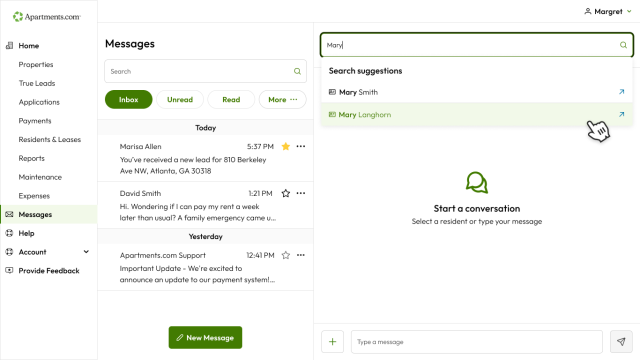
The Messages platform isn’t just great for receiving messages; you can also start them. Simply select “New Message” and then enter who you are looking to contact. Sometimes it’s better to message your tenants, rather than calling. For example:
- Rent payment reminders
- Non-urgent updates
- Appointments
- Special requests
Attach photos
Attaching photos is possible in any conversation. Simply pick the plus button on the messaging chain and pick “attach an image.” You can even send multiple photos at a time. Whether you want to send images of your rental to a prospective renter or share maintenance photos with a tenant, Apartments.com makes it simple.
See leads
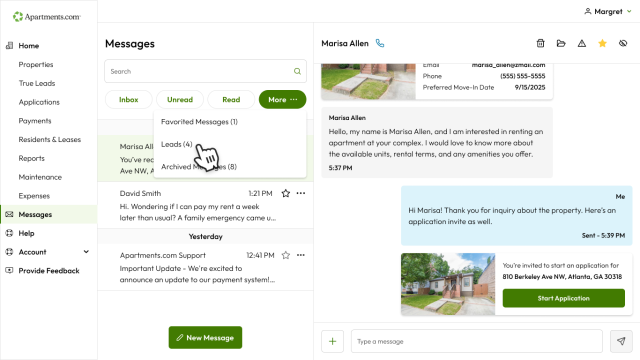
When a prospective renter messages you for the first time, it’s identified as a lead. You’ll get their message, along with information on which property they’re interested in, their email, phone number, and preferred move-in date. You can get right down to business and answer their questions instead of trying to figure out what property they are inquiring about.
Since leads are so important for landlords, you don’t want to miss a single one. To make it easier to identify lead messages, use the lead filter by selecting “more” and then choosing “leads.” Vacancies are filled quicker since you can answer questions promptly with the Messaging platform.
Invite a renter to apply
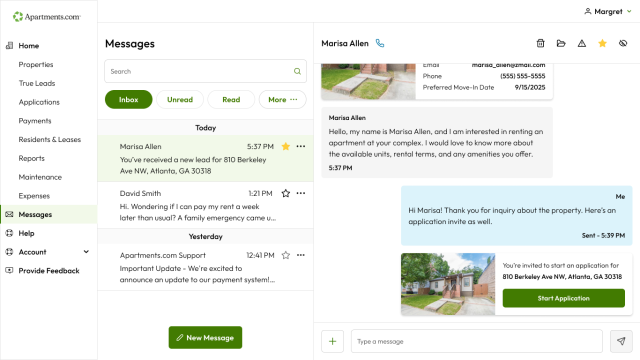
After chatting with the renter and confirming their interest, invite them to apply directly in messages. Select the plus button within the conversation, then choose “Send Invitation to Apply.” This makes it simple for renters to take the next step.
Favorite, filter, search, and archive conversations
Every inquiry is different, so filters and sorting can help you stay organized. Use them to manage messages more efficiently:
- Favorite messages that you want to revisit quickly
- Filter by leads to see which messages are prospective renters
- Search by tenant to pull up a specific conversation
- Archive older message threads to keep your inbox clean while retaining them as records
Enable auto replies
Since tenants value fast response times, auto replies help you stick to this timeline. Enable it under “Message Preferences” on your “My Account” page. You’ll be able to enter an auto reply message that will be sent if you don’t respond to the conversation’s first message within one hour.
Manage your notification preferences
Whenever a message is sent, you’ll get an email notification. If you want to change this, go to the “My Account” page and alter it under “Message Preferences.”
Why Landlords Should Use Messages
Fast response times matter when a renter reaches out. If someone is actively searching, they’re often contacting multiple properties at the same time. A faster response can help you make a strong first impression and keep a qualified lead engaged before they move on to another listing.
A centralized inbox also cuts down on missed opportunities. When every message lives in one place, it becomes easier to see who asked a question, who needs a follow-up, and who is ready for an application invite. That visibility matters even more when several inquiries arrive in a short window.
The Messages platform also helps with day-to-day organization. Search tools, filters, favorites, and archived conversations make it easier to sort active leads from older threads. And when your communication is documented in one place, there’s less room for confusion later about what was shared, when it was shared, and what the next step should be.
Keep Your Messages in One Place with Apartments.com
Managing rental inquiries is easier when your conversations are not scattered across multiple channels. Apartments.com Messages helps landlords respond faster, stay organized, and keep communication in one place from first inquiry to next step.
Apartments.com Messages is more than an inbox. It’s the communication layer that supports a smoother leasing workflow across listing, application, screening, and resident management. For landlords looking to simplify the process, it is a practical way to stay organized while giving renters a better experience.
FAQs
Is Apartments.com Messages free for landlords?
Yes, Apartments.com Messages is free for landlords. It is one of the many features offered to landlords who list and manage their rental property through Rental Manager.
Can I use Apartments.com Messages for both leads and current renters?
Yes, the Messages platform can support conversations with prospective renters and can also fit into ongoing communication workflows tied to resident interactions.
Can I send photos through Apartments.com Messages?
Yes, you can attach photos to a message.


