Published on
When renters are searching for their next place, they don’t want to just imagine what your apartments and community amenities look like — they want to see them. High-quality multimedia can draw renters into your listing and help them fall in love with your community.
As you prepare for peak leasing season, it’s worth giving the multimedia on your listings another look. Are the visuals telling the full story?
Why multimedia matters

Today’s renters are doing most of their search online, and media is an important part of that process. On average, renters expect to research nine properties, tour five, and seriously consider four, according to the latest Apartments.com survey of 20,000 prospective renters.
Multimedia-rich listings help renters see what the community looks like, inside and out.
As a 43-year-old renter in Minneapolis explained: “I need to have a good idea of what it looks like prior to investing the time in physically going to view the unit.”
Photos, videos, and 3D tours can provide important information about the property and available units, including showing amenities, features and finishes, and layout.
Even though nearly eight in 10 renters in the survey said they want to see unit-specific photos, most listings today don’t include them.
Media is an important element to help your listing draw in future residents. When renters come across listings that lack sufficient photos and videos, many don’t bother further with the property.
“If I can’t see what I need online, I’ll move on to the next unit,” said a 36-year-old renter in Denver, “because I don’t want to have to call or email to get the information.”
Multimedia can increase renters’ trust in your community. A 21-year-old renter in the suburbs of Winston-Salem said she avoids listings that don’t have enough photos.
“If there are no photos, I feel like they are trying to hide something,” she said. “Very sketch.”
Comprehensive media pays off. Apartments.com listings with 3D tours generate 23 times more leads than those without.
What media you can add to your Apartments.com listing

Your Apartments.com listing supports a variety of media types, including high-resolution photos, high-definition videos, and virtual tours.
Depending on your ad package, you can add anywhere from a maximum of 20 photos on a Silver package to 40 with Diamond Plus. For an unlimited number of photos, consider the Diamond Plus with Matterport Max ad package, which has no upper limit.
In addition to photos, videos and virtual tours can help you provide prospects with a comprehensive overview of your community. Matterport 3D tours are supported on listings with Gold or higher ad packages, and high-definition videos are included for listings Diamond and above.
On average, Apartments.com listings have 33 photos each. Sixty-nine percent of listings feature at least one 3D tour, and 18 percent have at least one video.
Where to get high-quality media

Do you have to hire a professional photographer to get great media? Not necessarily. Depending on your advertising package, you may already have access to high-quality media at no added cost.
Apartments.com ad packages at levels Gold and above include a professional media shoot by a CoStar architectural photographer. The shoot captures high-resolution photographs as well as Matterport 3D tours.
If your ad package qualifies your property for a CoStar media shoot, make sure to take advantage of it — and don’t forget to upload all the photos and Matterport tours you receive.
If you have additional media outside of your shoot, you can also upload these items to your listing.
Which photos drive the most leads
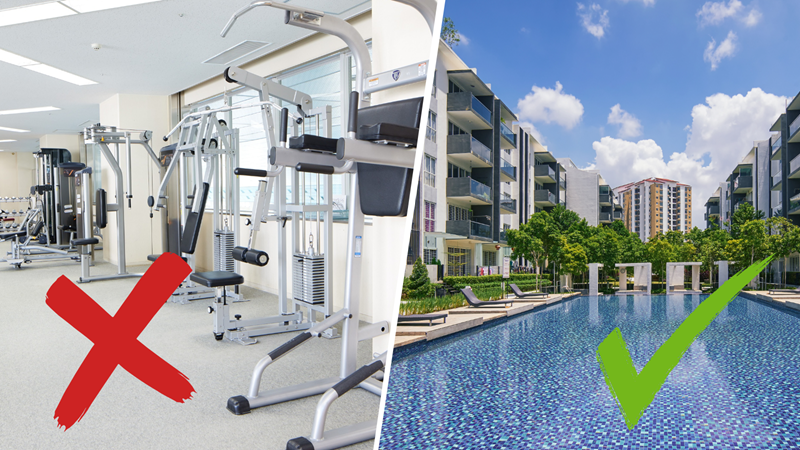
Want your listing to stand out? Choose the right primary photo.
As the image that represents your property in search results, your primary photo plays a decisive role. It can be the reason they click through to your listing — or choose to keep scrolling.
It’s no surprise that attractive photos of kitchens and living rooms draw in more renters than images of bathrooms. An Apartments.com analysis of photo effectiveness found that bathroom images performed the worst of all primary photos.
But how do interior and exterior shots compare? It depends on your property type.
For new, high-end communities with beautiful exteriors, shots of the outside of the building can drive the most traffic. This includes photos of gorgeous outdoor amenities, like pools and luxurious common areas.
But for buildings that are older or more modest, interior shots perform best. Of these photos, the most effective are kitchens, living rooms, and bedrooms.
The analysis found that certain images should never be used as a primary photo, regardless of your building type. Fitness center photos and floor plans joined bathrooms as the lowest performing image types. When set as the primary photo, these image types consistently generated the fewest clicks across all building types and geographies.
That doesn’t mean you should scrap these images. Renters still want to see them. In fact, 68 percent of renters say they want to see unit floor plans, and many rely on them to understand whether the layout of a specific apartment will meet their needs. Similarly, nearly one in five renters consider a fitness center to be an essential amenity.
But these images should play a supporting — not starring — role in your listing. Upload them to your listing, and order them near the end of your photo carousel. Give the coveted primary photo slot to an image that’s proven to generate traffic, followed by other top-performing photo types.
Get more tips on leveling up your listing
Multimedia isn’t the only way to get your listing ready for peak leasing season. Stay tuned for more ways to improve your listing. You can also check out these resources: