

When you’re searching for a new apartment, you want more than a glimpse inside a floor plan. You want to see the entire place. 3D tours made it easy to walk through a home without stepping inside. But that’s only half of the picture.
You also want to understand the community around you. The places you’ll live in and pass every day, like the walkways, green spaces, outdoor amenities, parking, and buildings.
Apartments.com started with 3D tours, and now we’re bringing that same clarity outdoors with 3D exteriors. This new feature gives renters a fuller, more transparent view of where they’ll live next.
Key Takeaways
- Apartments.com now offers 3D exterior tours, giving renters a 360-degree interactive view of apartment communities, including walkways, parking lots, outdoor amenities, and building layouts — all without leaving home.
- 3D exteriors reveal layout details like amenity placement, building proximity, and neighborhood surroundings that traditional photos don’t show, helping renters quickly find an option that fits their needs.
- This new feature builds on Apartments.com’s legacy of 3D innovation, expanding Matterport-powered tools from interiors to entire community exteriors for a more complete apartment search.
What Are 3D Exteriors on Apartments.com?
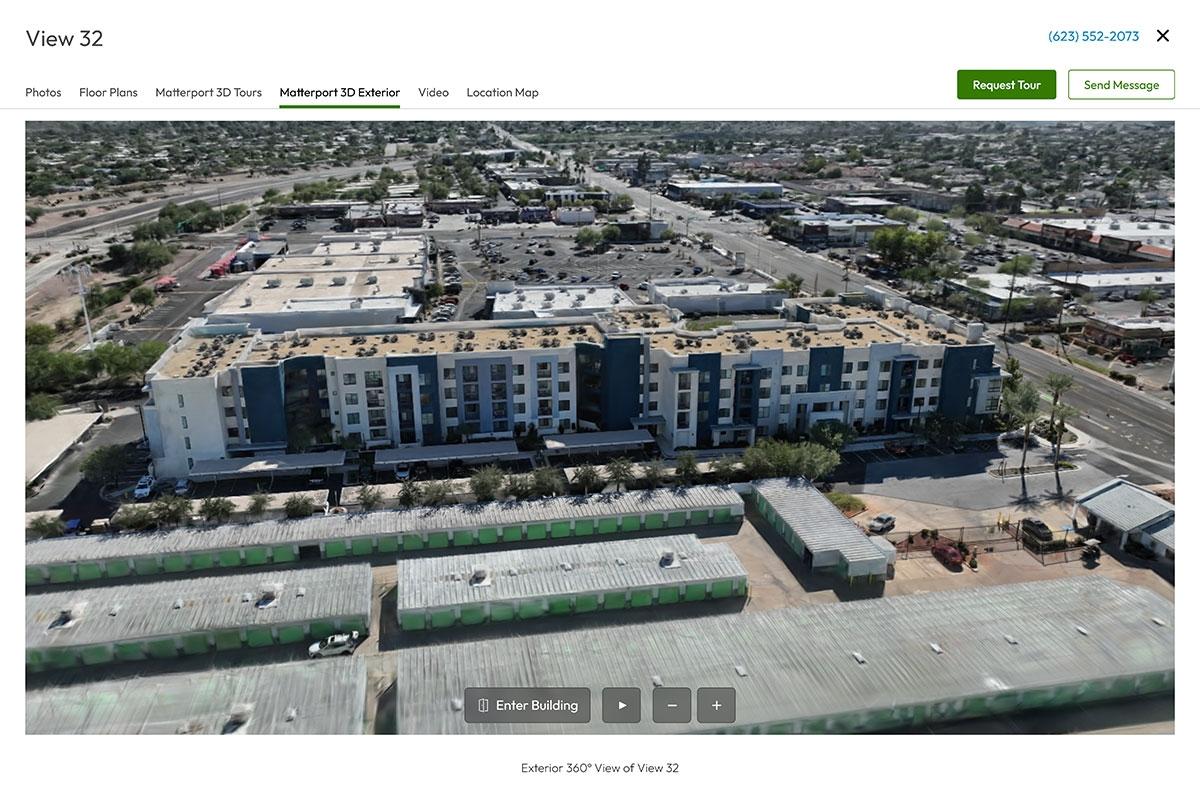
3D exteriors on Apartments.com are interactive tours of the exterior of apartment communities. With crystal-clear footage and 360-degree views, you can pan and zoom to explore every inch of the property. It goes beyond photos by offering a detailed layout that ties everything together.
Why 3D Exterior Views Matter in Your Apartment Search
Normally, you have to take an in-person tour to be able to see the community and its layout. Now, you can do it from the comfort of your home. Explore the grounds at your own pace and understand the look and layout of a community without taking a single step with 3D exteriors.
3D exteriors help you understand the apartment community and neighborhood. You can see how the property flows together and what living there might actually feel like with 3D exterior tours. As you’re exploring, make sure to look out for key details.
What to look for in 3D exteriors
Here are some valuable insights that 3D exteriors can provide:
- Parking layout: Know where you will be able to park and how many spaces there are.
- Building placement and proximity: See how buildings sit in relation to each other and what they’re close to.
- Amenity locations: Spot exactly where the pool, grilling stations, fitness center, and other outdoor amenities are.
- Community surroundings: Get a sense of the neighborhood and what’s nearby.
- Building details: Check out how many floors there are in each building, balconies, and other exterior features.
How to Use 3D Exteriors on Apartments.com
3D exteriors are simple to find on Apartments.com. They are located on the listing page image gallery with the label, “Matterport 3D Exterior.” Intuitive controls make them easy to navigate on both computers and mobile phones.
Here is the step-by-step guide to using 3D exteriors on Apartments.com:
- Start by searching for apartments in your desired city.
- Open a listing and scroll through the media gallery. If a 3D exterior is available, you’ll see it displayed in the gallery.
- Select 3D exterior to launch the viewing tool.
- Rotate the model using your cursor or touch screen. You can zoom in to inspect specific areas or zoom out to see the entire community layout.
- Return to the listing details to explore pricing, availability, and interior features while keeping the exterior layout in mind.
3D exteriors are transforming how renters search for apartments, so stay tuned as you’ll start seeing more of them across Apartments.com.
Make a Confident Move with Apartments.com
With 3D exteriors, renters can understand a community before they ever schedule a tour. It’s a clearer, smarter, more efficient way to search where you can explore communities from every angle, compare layouts, and narrow your list. Apartments.com gives you the details you need to make your next move with confidence.
FAQs
Can I explore 3D exteriors on mobile and desktop?
Yes! 3D exteriors are easy to use regardless of what platform you are on. With intuitive controls to move around, you can explore your apartment community on mobile and desktop.
Can you move between interior and exterior 3D tours on Apartments.com?
The exterior is only half of the journey, which is why Apartments.com has made it seamless to travel into the apartments. Simply click on “Enter Building” and you will be taken to interior 3D tours.


